





.jpg)
The Solana transaction fee is a ticket to a local execution queue, under compute limits, with a separate auction path for bundles when native priority fees stop working.
This guide explains the fee matters for trading bot teams, technical founders, and engineers who own the landing rate and infrastructure spend. The angle is narrow on purpose: how Solana prices one transaction, how much priority fee to pay, and where Jito tips fit. We hold to Solana-native methods and name a few provider fee APIs so the picture stays complete.
.png)
If you’re quite familiar with the basics and hunting the details on Jito tips, read this Jito MEV guide.
TL;DR for busy teams
- Base fee is 5,000 lamports per signature.
- Priority fee =
ceil(compute_unit_price × compute_unit_limit ÷ 1,000,000)lamports, 100% to the validator. - Max CU per transaction is 1,400,000. Default per non-builtin instruction is 200,000. Block limit is 60,000,000.
- Fees are local to writable accounts, not global. A quiet network does not mean a cheap trade.
- Estimate fees from recent paid fees on your account set, then raise the price before raising the CU limit.
- Use a priority fee for single-leg flows. Add a Jito tip when atomic, multi-step execution decides your edge.
Solana fees are an execution problem, not a gas problem
Fees on Solana are part of the execution strategy, not a flat network tax. Three levers set cost and landing: the base fee per signature, the compute budget you request, and the priority fee you bid. A fourth path, Jito tips, sits off to the side for bundle flows.
.jpg)
For a bot, the wrong setting hits fill rate, slippage, and P&L, not only the fee line. Eclipse Labs research found p10 fees on a simple USDC transfer running two orders of magnitude above p90. Many teams overpay or fail to land for the same trade.
The fee stack behind one Solana transaction
A Solana transaction fee has two real parts: a fixed base fee and an optional priority fee tied to compute. Everything else is how you size those two.
The base fee is 5,000 lamports per signature, split 50% burned and 50% to the validator. The priority fee follows one formula, with the full amount going to the validator:
The priority fee is based on the CU limit you request, not the CU you use. Set the limit too high—and you pay for headroom you never touch.
| Component | Where set | Impact on landing | Impact on cost |
|---|---|---|---|
| Base fee | Per signature, fixed | Required to be valid | 5,000 lamports each |
| CU limit | SetComputeUnitLimit |
Too low fails, too high lowers effective bid | Sets fee ceiling |
| CU price | SetComputeUnitPrice |
Higher price improves queue position | Multiplies the fee |
| Loaded data size | SetLoadedAccountsDataSizeLimit |
Default 64 MB adds ~16k CU overhead | Dilutes priority per CU |
Compute units decide both cost and landing
Compute units control whether you land at all and how much you pay. Under-budget—and the runtime halts the transaction. Over-request makes your effective fee per CU drop, which lowers your priority for the same lamports.
The default is 200,000 CU per non-builtin instruction, capped at 1,400,000 per transaction. A basic token transfer needs roughly 6k execution CU, but an unset loaded-data limit can add ~16k CU of overhead.
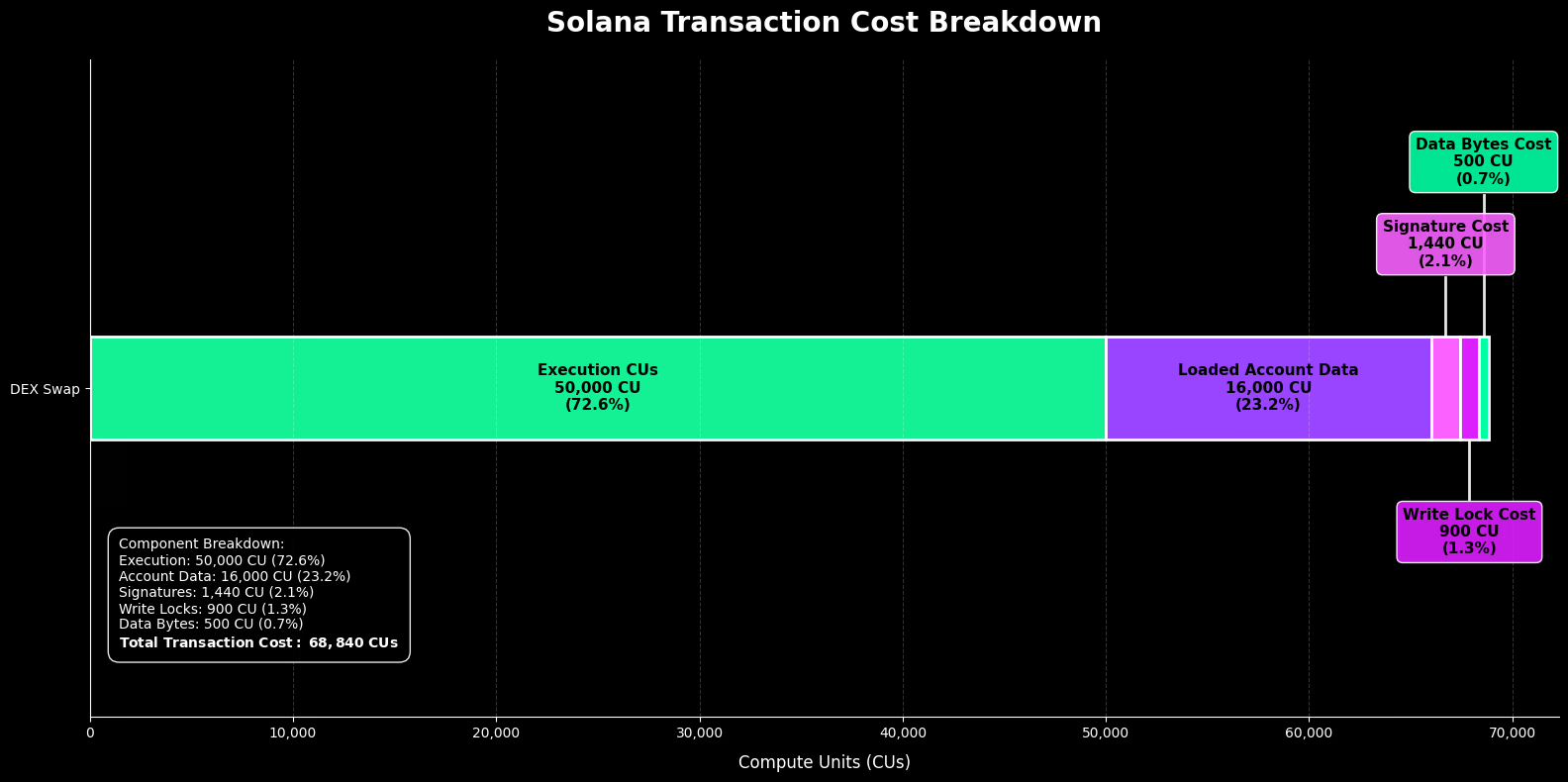
Micro-case. A bot simulated a swap route at 280k CU. Instead of hardcoding 1.4M, it set a 320k limit, a 10% margin over simulation. During congestion, it kept its effective price per CU high and landed at a lower total cost than peers, maxing the budget. The fix was the simulation in the send loop, not a bigger bid.
Local fee markets changed how to price Solana transactions
Fees are local to the writable accounts your transaction touches, not the whole chain. Contention attaches to hot accounts, so two bots hammering the same pool reprice that one market while the rest of the network stays cheap.
This is the trap behind most overpaying. The global network can look quiet while your target account is fully contended. During the TRUMPandTRUMP and TRUMPandMELANIA launches, utilization on those token accounts sat near the 12M CU per-account ceiling while the chain had room.
For high-frequency flows, fee estimation has to be account-aware. A network-wide number is a poor proxy for the price of your specific trade.
How much priority fee to pay on Solana
No fixed number survives across slots, so price from recent fees on the accounts you touch, then tune by urgency and the cost of failure. The native tool is getRecentPrioritizationFees, which checks a cache of the last 150 blocks and returns fees paid by transactions locking your account list.
The native method has limits. The vanilla @solana/web3.js call returns a single network value, which is weak for local pricing. Provider fee APIs fill that gap with percentile, account-aware estimates: Helius getPriorityFeeEstimate and QuickNode qn_estimatePriorityFees both return percentile bands and a recommended level.
Operational rules:
- Raise CU price before raising CU limit. Price buys priority, limit only buys headroom.
- Cap fees as a fraction of expected edge. A liquidation worth more justifies a higher bid than a low-edge swap.
- Re-estimate when the route or target account changes.
| Scenario | Urgency | CU strategy | Fee signal | Submission path |
|---|---|---|---|---|
| Low-edge swap | Low | Simulate + 10% | p25–p50 local |
Standard RPC |
| Standard bot execution | Medium | Simulate + 10% | p50–p75 local |
Standard RPC |
| High-value latency trade | High | Simulate + 10% | p75–p95 local |
Standard RPC, escalate price |
| Atomic multi-step / liquidation | High | Per-tx simulate | p90+ plus tip |
Jito bundle |
Priority fees vs Jito tips
A priority fee is a native scheduler signal. A Jito tip is an off-chain auction payment for the bundle path. They are not interchangeable, and using the wrong one is where teams burn money.
A priority fee competes inside the leader's normal queue and improves your ordering on standard submission. A Jito tip enters a separate auction for bundles: ordered, all-or-nothing groups of transactions. For a single swap, a tip alone does nothing for your native priority. For atomic arbitrage across two DEXes, a priority fee alone cannot guarantee the legs land together.
| Dimension | Priority fee | Jito tip | Best fit |
|---|---|---|---|
| Mechanism | Native scheduler | Off-chain auction | — |
| What it buys | Queue priority | Bundle inclusion + ordering | — |
| Atomicity | No | Yes, within bundle | Tip for multi-tx atomic |
| Single swap | Useful | Adds overhead | Priority fee |
| Cross-DEX arb | Insufficient alone | Designed for it | Priority fee + tip |
Some flows need both: a priority fee for native ordering plus a tip for bundle protection.
If your strategy depends on bundles, auction routing, or atomic execution, read our full Jito explainer for the bundle and auction mechanics.
When bots should pay priority fees only
Use a priority fee alone when execution is single-leg and the order across transactions does not determine your edge.
- Single swap or transfer;
- Lower-contention routes where local fees are cheap;
- Cost-sensitive flows where bundle overhead is not worth it;
- Any flow with no atomic dependency across multiple transactions.
Here, the priority fee plus a tight CU limit is the whole job. Adding a tip only raises cost.
When Jito tips are worth the extra spend
Add a Jito tip when non-atomic landing destroys your edge, so paying for bundle inclusion beats the cost of a partial fill.
- Atomic multi-step strategies that must land together or not at all;
- Liquidation races where being first and complete defines the win;
- Cross-DEX arbitrage, exposed to adverse selection between legs;
- Protected execution where a stranded first leg is worse than no trade.
Weigh the tip against the cost of a failed or partial landing, not against the base fee.
Code example: Fee-aware transaction building in web3.js
The pattern is: simulate, set a CU limit with a margin, set a CU price from your estimate, then send with a fresh blockhash. This snippet uses @solana/web3.js v1 for illustrative purposes.
Set the CU limit before your application instructions, so a heavy step does not exceed the default before the limit applies.
The infra layer under fee efficiency
Good fee logic still fails on a weak submission path. The same bid that lands on a fast, well-routed RPC can stall on a slow, shared one, and congestion is exactly when the gap shows.
What matters for your team under load:
- Slot freshness and low time-to-leader;
- Stake-weighted QoS routing for non-duplicate transactions;
- Regional routing and failover;
- Landing telemetry you can act on.
RPC Fast Beam is the low-friction transaction delivery path for Solana, built to keep well-priced transactions landing during contention. Beam grows and matures after becoming the Beta, so check the docs for current limits before production use.
RPC Fast runs two ways into that path: shared SaaS plans that start at $0 with no card and scale through paid tiers, and dedicated bare-metal Solana nodes from $2,200/month with the server, setup and maintenance included, normally delivered within 72 hours. Plan credits meter RPC calls on our side and are separate from the Solana network fees priced above, which are paid to validators.
For teams that also watch the flow they compete with, Aperture TxStream attaches a predicted execution result to each streamed transaction while it is still in flight — around 95% accurate against actual execution, at a cost of roughly +791 µs to median delivery. It is included on the Aperture plan; on Stream, TxStream is available without that simulation.
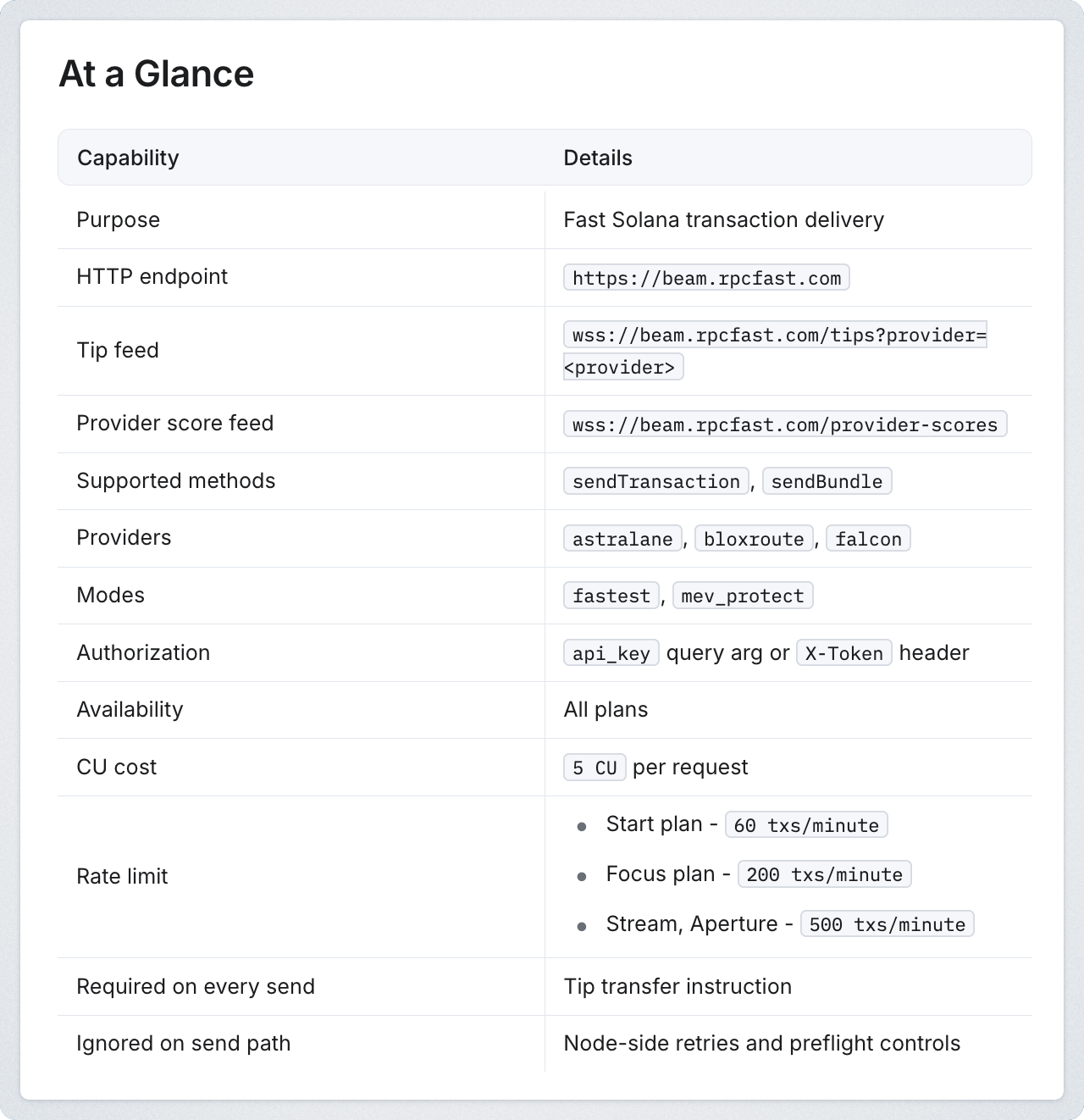
Start free on RPC Fast — $0 plan, no card. Beam delivery is on every plan.
Launch RPC Fast.jpg)


.jpg)


