





If you're running a Solana project—whether it's a DeFi protocol, an NFT marketplace, a trading bot, or blockchain analytics infrastructure—you've probably noticed that not all RPC methods are created equal. Some are lightweight and fast. Others are resource-intensive and can slow down your node if your infrastructure isn’t prepared.
At RPC Fast, we've structured our dedicated node offerings into three tiers: Light, Medium, and Pro. Each tier is designed around the specific RPC methods your project needs and the hardware required to support them.
We'll walk through each tier, explain what methods are available, and help you understand which setup matches your project's needs.
Meet Solana dedicated node tiers from RPC Fast
Before we dive into the methods themselves, here's the high-level breakdown:
- Light (512GB RAM): Covers the vast majority of standard Solana RPC methods.
- Medium (1152GB): Adds support for the most commonly used heavy methods, particularly
getProgramAccountsandgetTokenAccountsByOwner. - Pro (1.5—2.3TB): No limitations. Full access to all Solana RPC methods, including the most resource-intensive ones.
All three tiers sit on the dedicated bare-metal line: from $2,200/month, with the server, setup and maintenance included, delivered within 72 hours. The same Solana RPC methods are also served by RPC Fast’s shared SaaS plans — a free Start plan at $0 with no card, then $45, $249 and $499 a month, rated at 15, 50, 150 and 500 requests per second with 1.5M to 120M monthly credits.
Now let's break down what that actually means in practice.
Light tier: The foundation
The Light tier gives you access to all default Solana RPC methods except the heavy ones. This is the workhorse tier—it handles the core functionality that most Solana projects rely on daily.
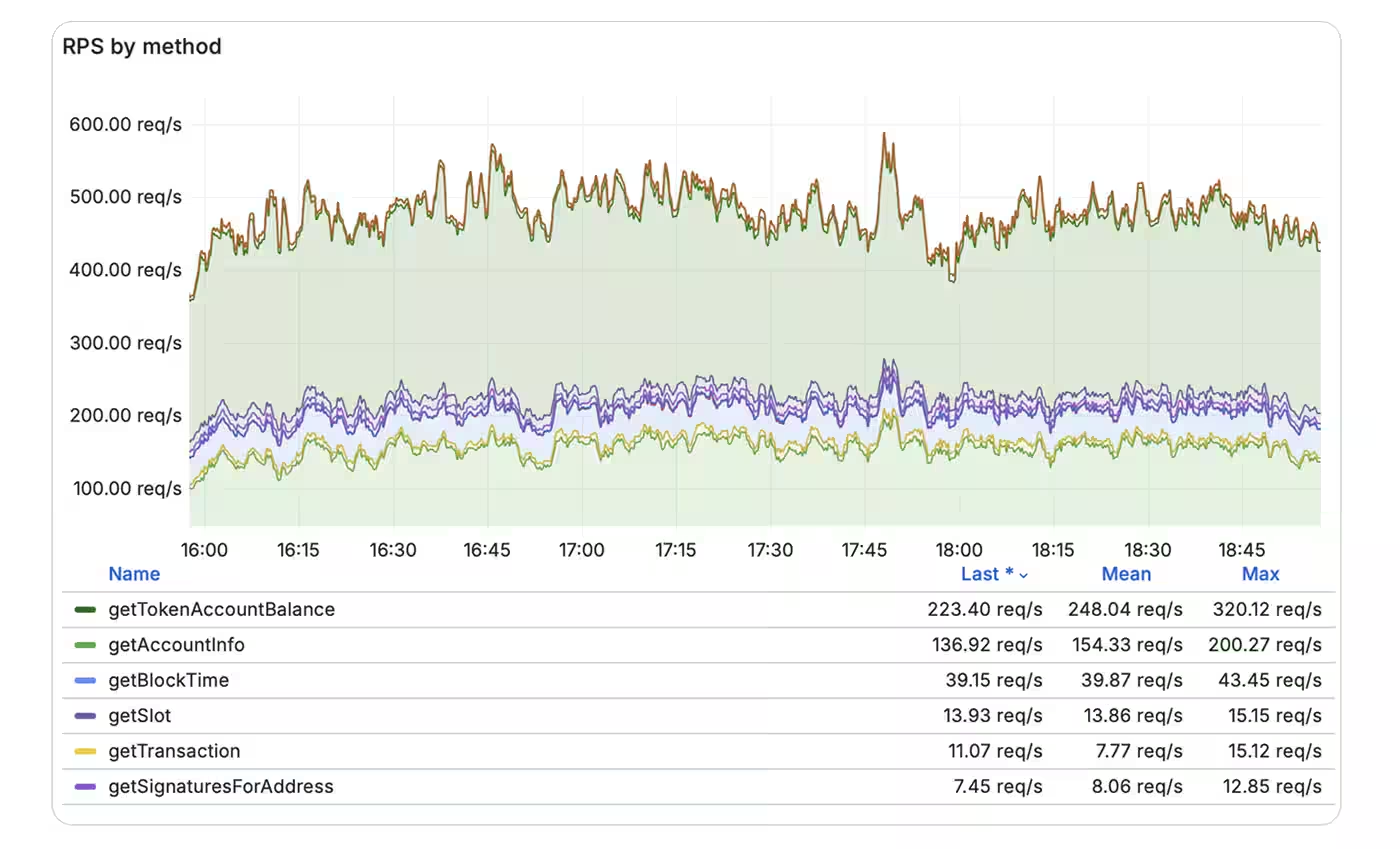
On a dedicated node there is no single latency figure — it is per method. Light calls such as getSlot and getSignaturesForAddress run at 2–3 ms, mid-weight ones such as getBlockTime and getTransaction at 6–12 ms, and heavy account reads such as getAccountInfo at 25–35 ms, with peaks to 59 ms.
What's included
Here's how the methods break down by category:
| Category | Methods | What They Do |
|---|---|---|
| Block & Slot information |
getBlock, getBlocks, getBlockHeight,
|
Retrieve block data, slot numbers, and blockchain height. Essential for syncing and monitoring the chain state. |
| Transaction queries |
getTransaction, getSignatureStatuses,
|
Look up transaction details, confirmation status, and historical signatures for addresses. |
| Account data |
getAccountInfo, getBalance,
|
Fetch account balances, metadata, and stake information. Core methods for wallets and dApps. |
| Network & Validator info |
getClusterNodes, getEpochInfo,
|
Monitor network health, validator performance, and epoch data. |
| Transaction submission |
sendTransaction, simulateTransaction
|
Submit transactions to the network and test them before sending. |
| Fee & Rent calculations |
getFeeForMessage,
|
Calculate transaction fees and rent requirements. |
All the information on the light methods is available in the official Solana docs.
You'll notice that methods like getProgramAccounts, getTokenAccountsByOwner, getTokenAccountsByDelegate, and getTokenLargestAccounts are not available in the Light tier. These are the heavy hitters—methods that scan large portions of the blockchain and require significantly more memory and compute power.
Pre-flight checking on the node itself stops at simulateTransaction. On the SaaS line, the Aperture plan adds Aperture TxStream, which attaches a predicted execution result to each transaction while it is still in flight — around 95% accurate against actual execution, at a cost of about +791 µs to median delivery; on the Stream plan TxStream currently runs without execution simulation.
Plugins & Integrations for Light
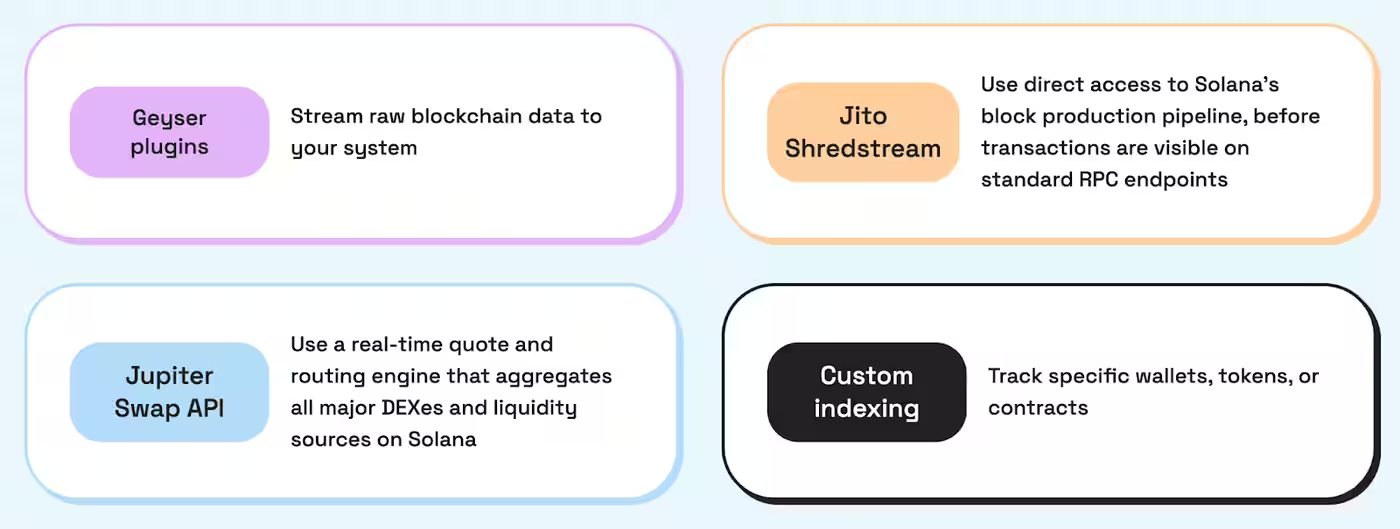
Even at the entry level, we ensure your node is HFT-ready. The Light tier supports essential low-latency tools, including Yellowstone gRPC/Geyser for streaming raw data and Jito ShredStream to receive shreds directly from leaders.
You can also opt for the SOL Trading API by bloXroute as an add-on to enhance your execution speed.
Who should stick to Light?
If you're building a wallet, a standard dApp, or any application that queries individual accounts and transactions without needing to scan entire program states, the Light tier is your best bet. It's fast, reliable, and covers everything you need for typical Solana interactions.
Medium tier: Adding account scanning power
The Medium tier is where things get interesting. You get everything from Light, plus two of the most commonly requested heavy methods: getProgramAccounts and getTokenAccountsByOwner.
What's added
| Method | What it does | Why it's heavy |
|---|---|---|
getProgramAccounts |
Returns all accounts owned by a specific program. You can filter by account size, data content, and more. | This method scans potentially thousands (or millions) of accounts. Without proper filtering, it can return massive datasets and consume significant memory. |
getTokenAccountsByOwner |
Returns all token accounts owned by a specific wallet address. Essential for displaying token balances in wallets and portfolio trackers. | Similar to getProgramAccounts, this method scans the token program's state to find all accounts matching the owner. High memory usage, especially for wallets with many tokens. |
These two methods are critical for projects that need to:
- Track all tokens held by a wallet
- Query all accounts associated with a specific program (e.g., all open orders on a DEX)
- Build analytics dashboards that aggregate account data
The Medium tier does not include
getTokenAccountsByDelegate
or
getTokenLargestAccounts
.
These are even more
resource-intensive and are reserved for the Pro tier.
Plugins & Integrations for Medium
The Medium tier steps up the utility by including the Jupiter Swap API alongside the standard gRPC and Jito integrations. This allows you to run a self-hosted aggregator for fast, private swap executions directly on your dedicated hardware, making it a favorite for DeFi-heavy applications.

Who should use Medium?
If you're building a wallet, portfolio tracker, DEX interface, or any application that needs to scan token accounts or program state at scale, Medium is your tier. You get the power to query account data efficiently without the overhead of the full Pro setup.
Pro Tier: No limits, full control, and customization
The Pro tier removes all restrictions. You get every Solana RPC method, including the most resource-intensive ones, plus the flexibility to request custom integrations and tools.
What's added
The Pro tier includes the remaining heavy methods:
| Method | What it does | Why you'd use it |
|---|---|---|
getTokenAccountsByDelegate |
Returns all token accounts where a specific address is the delegate (authorized to transfer tokens on behalf of the owner). | Useful for advanced DeFi protocols, custodial services, and applications that manage delegated token authorities. |
getTokenLargestAccounts |
Returns the largest token accounts for a specific mint. | Helpful for analytics, whale tracking, and understanding token distribution. |
Advanced use case: getProgramAccounts at scale
Let's talk about getProgramAccounts in more depth, because it's one of the most powerful—and most misunderstood—methods in Solana.
When you call getProgramAccounts, you're asking the node to scan every account owned by a specific program and return the results. Without filters, this can mean scanning millions of accounts. That's why filtering is critical.

Example use case: You're building a DEX aggregator and need to find all open orders for a specific trading pair on a particular DEX program. Instead of querying every account, you use getProgramAccounts with a filter that matches the trading pair's mint addresses. This dramatically reduces the dataset and makes the query feasible.
Thus, the Pro tier gives you the memory and compute power to run these queries and use any methods reliably, even under heavy load.
Method weight also lands on the bill on the SaaS line: a standard RPC call costs 1 credit, getProgramAccounts costs 10, and a Beam submission costs 5, with overage at $5 per 1M credits. Heavy methods are enabled there from the $45/month Focus plan up, not on the free Start plan.
Custom integrations
Beyond the standard RPC methods, the Pro tier is built for flexibility. Need custom indexing for specific wallets or tokens? Want to integrate a proprietary trading tool? We're ready to work with you on custom implementations that fit your exact requirements.
Who should use Pro?
Pro is for teams running high-frequency trading operations, advanced blockchain analytics, or any project that needs unrestricted access to Solana's full RPC suite. If you're hitting rate limits or performance bottlenecks on a shared Solana SaaS plan, Pro is the answer.
Choosing your Tier: Short selection guide
Here's how to think about which tier matches your project:
Choose Light if:
- You're building a trading bot, analytics tooling, dApp, or standard Solana integration;
- You query individual accounts and transactions;
- You don't need to scan program state or token accounts at scale.
Choose Medium if:
- You need to track wallet activity thoroughly;
- You plan to use the Jupiter Swap API;
- You're building a DEX interface, portfolio tracker, low-latency trading bot, or analytics dashboard;
- You need
getProgramAccountsandgetTokenAccountsByOwner, but not the most resource-intensive methods.
Choose Pro if:
- You're running high-frequency trading infrastructure;
- You need unrestricted access to all Solana RPC methods;
- You require custom integrations, indexing, or advanced tooling;
- You're hitting performance limits on other tiers.
Haven’t found your case? Consult our engineers on a free infra call
Contact us
Understanding which RPC methods you actually need is the key to choosing the right infrastructure. Most projects don't need the full Pro tier—Medium or even Light will handle the job perfectly. But if you're pushing the limits of what's possible on Solana, Pro gives you the headroom to scale without compromise.
The goal is to ensure you have the right tools for the job, so your project runs smoothly, and your users get the performance they expect.
.jpg)


.jpg)


