





This is the reference Solana's docs don't have. Every error category, cause, and fix—in one place. If your transaction is failing on Solana and the response gives you a code like Custom(6001) or BlockhashNotFound with no further context, the answer is somewhere on this page.
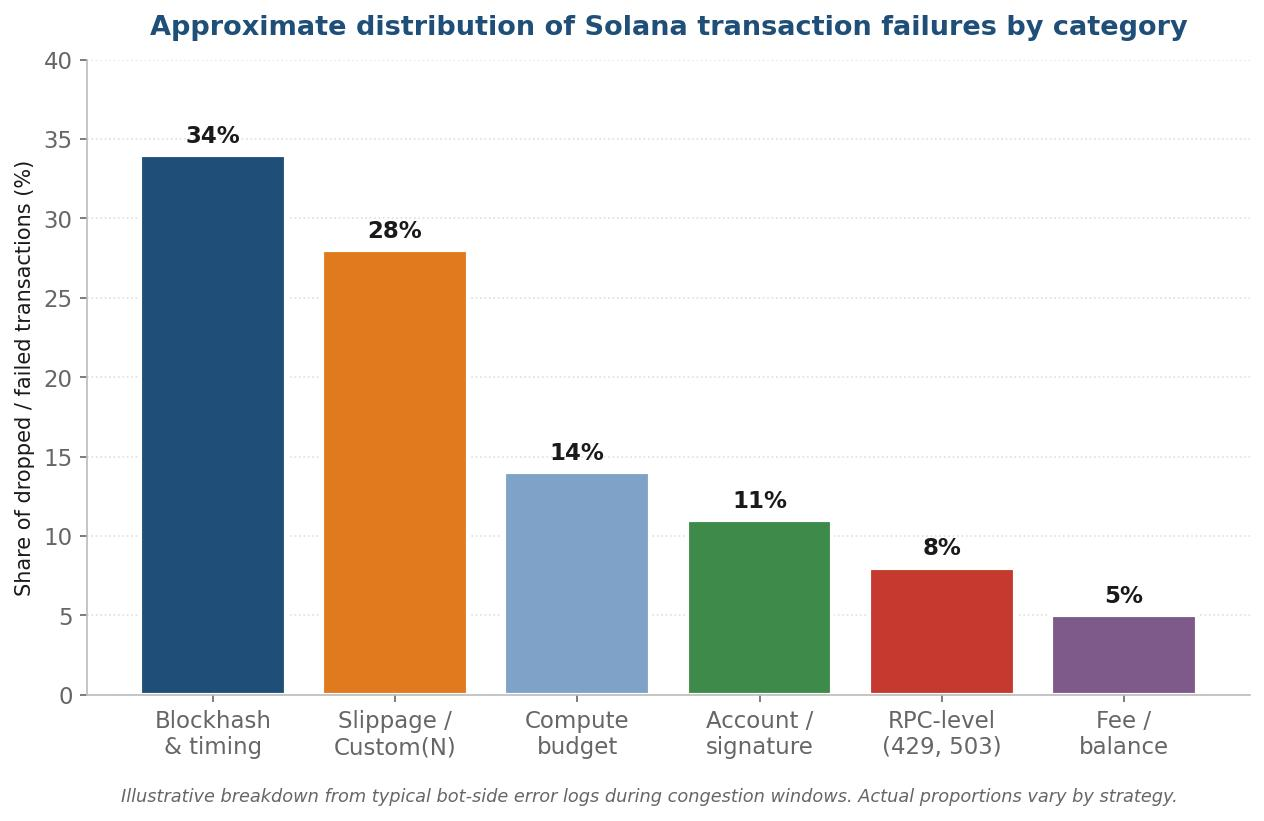
Solana errors aren't random. They cluster into six recognizable categories, each with predictable triggers and standard fixes. Network-wide transaction failure rates during congested periods in 2024–25 averaged around 39%—but only a handful of error codes account for the bulk of those failures. Read the right one against the right table, and most "why did this fail" investigations are over in a minute.
How Solana error responses are structured
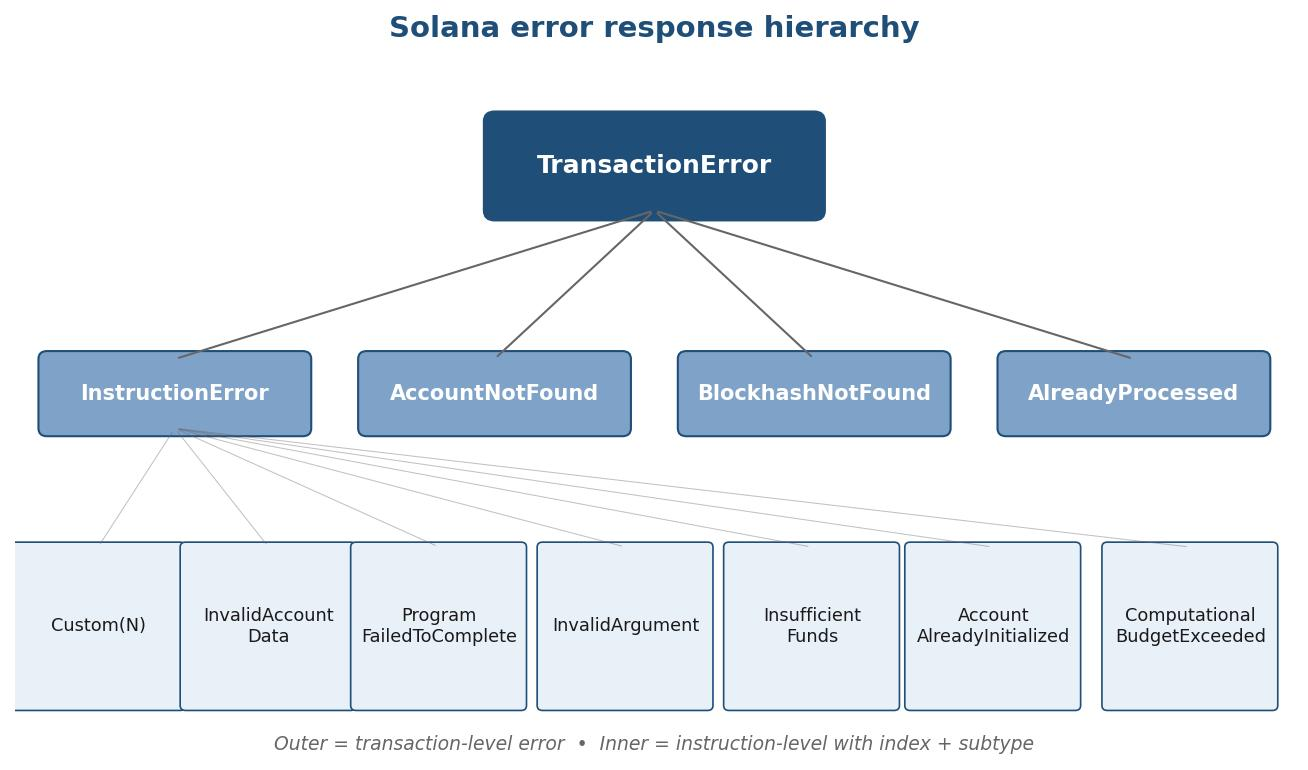
Solana errors come in two layers: a TransactionError at the outer envelope, and an optional InstructionError that points to which specific instruction inside the transaction failed and why. Knowing which layer your error sits in is the first triage step—outer errors are usually infrastructure-related, inner errors are usually program-related.
A real RPC error response from a failed transaction looks like this:
Three things to read from that response, in order:
- The outer error type. Is it an InstructionError (a program rejected something), AccountNotFound (a referenced account doesn't exist), BlockhashNotFound (the blockhash expired), or AlreadyProcessed (the transaction was already included)?
- The instruction index. If it's an InstructionError, the integer tells you which instruction in your transaction failed. 0 means the first; for compound transactions with multiple swaps, this matters.
- The inner code or subtype. Custom(N) is the program-specific code—N is what you decode against the program's IDL. Other subtypes (InvalidAccountData, InsufficientFunds, etc.) have fixed meanings across all programs.
Account & signature errors—quick reference
Account and signature errors fire before program execution begins. They mean Solana rejected the transaction at the validator level because something about its structure or references was wrong—usually a wrong account address, a missing signature, or an account in an unexpected state.
| Error code | What it means | Most common trigger | Fix |
|---|---|---|---|
| AccountNotFound | Referenced account doesn't exist on chain | Wrong pubkey, account not initialized yet, or stale state from a lagging RPC | Verify account exists with getAccountInfo; refresh from a low-lag RPC |
| InvalidAccountData | Account exists but its data doesn't match expected layout | Wrong account passed to wrong instruction, or program upgrade changed layout | Re-derive the PDA; check program version compatibility |
| InvalidSignature | Required signer didn't sign, or signature is malformed | Forgot to add signer, wrong keypair, or signature serialization issue | Audit the transaction's required signers; confirm wallet/keypair correctness |
| AccountAlreadyInitialized | Trying to create or initialize an account that already exists | Re-running a setup transaction, or PDA collision | Check account existence before creation; handle the existing-state path |
| MissingSignature | Transaction's required signer list incomplete | Multi-sig setup error, or wallet that didn't sign for a fee-payer role | Verify all required signers are present and signing |
Note that AccountNotFound frequently masquerades as a code problem when it's actually an RPC freshness issue—the account was just created but your RPC hasn't seen it yet. If you're hitting this on accounts you know exist, check your node's slot lag before changing code.
Fee & balance errors
Fee and balance errors mean the fee payer doesn't have enough SOL to cover either the transaction fee, the priority fee, or the rent for any new accounts the transaction creates. There's also one specific gotcha around USDC and SPL token transfers that catches teams repeatedly.
| Error code | What it means | Most common trigger | Fix |
|---|---|---|---|
| InsufficientFundsForFee | Fee payer lacks SOL for base + priority fee | Wallet drained, or priority fee unexpectedly high | Top up SOL; check current priority fee level before submission |
| InsufficientFundsForRent | Account creation requires rent exemption SOL not available | Creating new token accounts or PDAs without buffer | Pre-fund rent (~0.002 SOL per token account); verify rent-exempt balance |
| InsufficientFunds (token) | Token account doesn't hold enough tokens for the transfer | Stale balance read, or token decimals mistake | Refresh balance from low-lag RPC; verify decimals (USDC = 6, most SPL = 9) |
| TokenAccountNotFoundError | Recipient has no associated token account | First-time recipient for an SPL token (e.g., USDC) | Add a createAssociatedTokenAccount instruction before transfer |
The USDC gotcha specifically: if you transfer USDC to a wallet that has never held USDC before, the recipient needs an Associated Token Account. The transfer instruction alone won't create it. Your transaction reverts with TokenAccountNotFoundError. The fix is to bundle a createAssociatedTokenAccount instruction (~0.002 SOL of rent) before the transfer, or use the idempotent variant that no-ops if the account already exists.
Blockhash & timing errors
Blockhash errors mean your transaction referenced a blockhash that either expired or was already used. Both classes of error are infrastructure-driven rather than logic-driven—they reveal something about how your transaction reached the network, not what the transaction was trying to do.
| Error code | What it means | Most common trigger | Fix |
|---|---|---|---|
| BlockhashNotFound | Blockhash no longer valid; transaction expired before inclusion | Blockhash older than ~150 blocks (~60–90 s), or from a minority fork | Fetch fresh blockhash before each submission; use low-lag RPC |
| AlreadyProcessed | Identical transaction already landed in a block | Retry without changing inputs, double-submission, replay | Add a unique nonce or compute-budget instruction; check before retry |
| TransactionTooLarge | Transaction exceeds 1232-byte packet size | Too many instructions or accounts, no ALTs used | Use Address Lookup Tables; split into multiple transactions |
How to handle blockhash refresh in production:
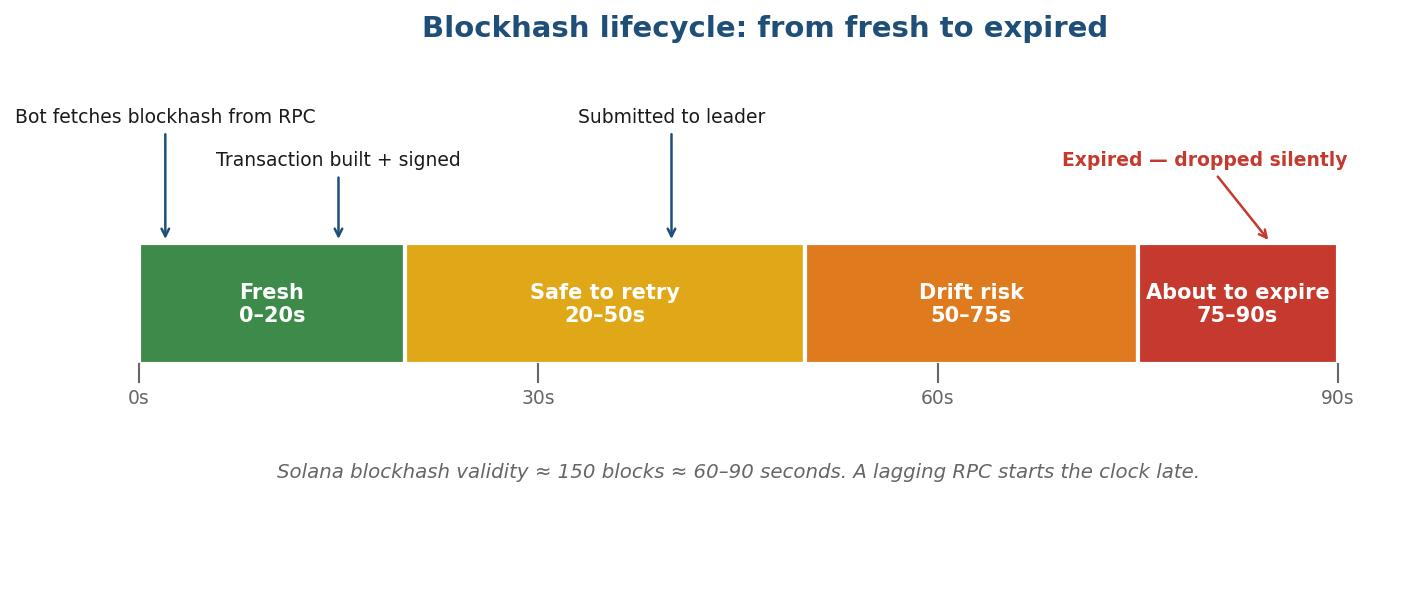
The hidden killer here is the lagging RPC. If your node sits 3–5 slots behind the chain tip, the blockhash you receive may not even exist on the canonical chain—it lives on a minority fork that gets abandoned. Your transaction references a blockhash that effectively never happened, and it's dropped silently with no explicit error to read.
Most blockhash drops are an RPC problem. Fix the RPC, not the code.
RPC Fast runs dedicated nodes co-located with validators.
Program execution errors
Program execution errors are the program saying "no"—the transaction reached the validator, executed, and a program inside it returned an error code. Most of these are Custom(N) errors, where N is a program-specific number that means nothing unless you decode it against that program's IDL or error table.
| Error code | What it means | Most common program | Fix |
|---|---|---|---|
| Custom(6001) / 0x1771 | Slippage tolerance exceeded | Jupiter, Raydium AMM | Increase slippage tolerance; verify quote freshness |
| Custom(6000) / 0x1770 | Minimum output amount not met | Most AMMs | Recalculate minOut against current pool state |
| Custom(1) / 0x1 | Invalid instruction data | Token Program, generic | Check instruction discriminator and account ordering |
| Custom(3012) | Account discriminator mismatch | Anchor programs | Account passed doesn't match expected struct; re-check derivation |
| Custom(6022) | Pool has insufficient liquidity | Raydium, Orca | Reduce trade size or wait for liquidity |
| ProgramFailedToComplete | Program panicked or hit unrecoverable state | Any | Read program logs to find the panic; usually a precondition violation |
| ComputationalBudgetExceeded | Transaction exceeded its compute unit limit | Complex DeFi flows, CPI-heavy txs | Increase compute budget via ComputeBudgetProgram; simulate to size it |
Decoding Custom(N) is a per-program exercise. The standard sources:
- Anchor programs expose errors via the Anchor framework's typed error system—the IDL contains the error name and message for each numeric code.
- Native Solana programs (Token, System, Stake) have their error enums published in the Solana SDK source.
- Jupiter returns slippage and route errors most commonly as 0x1771 (slippage) and 0x1770 (minOut).
- Raydium CLMM and AMM v4 publish their error tables in protocol documentation; the most frequent in production are slippage, insufficient liquidity, and tick-array bounds.
If the program is open-source and unfamiliar, the fastest path is grep against the program repo for the integer value. Solana's transaction documentation covers the error envelope structure but the Custom(N) decoding is always program-specific.
RPC-level errors—when the problem is your provider
RPC-level errors don't come from the chain. They come from the RPC provider standing between your bot and the chain. These are the errors that make teams blame their code when the actual fault is upstream—and the only way to tell the difference is to recognize the signatures.
| Error code | What it means | Most common trigger | Fix |
|---|---|---|---|
| 429 Too Many Requests | Rate limit exceeded on the RPC endpoint | Public/shared RPC during congestion; bursty traffic | Upgrade to a dedicated RPC; respect Retry-After header |
| 503 Service Unavailable / node_unhealthy | RPC node is overloaded or restarting | Provider-side outage or capacity issue | Failover to a secondary endpoint with automated failover |
| slot_skipped | Requested slot was skipped during consensus | Network condition; not a code bug | Retry with a different slot; expected occasional behavior |
| -32601 Method not found | RPC method not supported by this provider | Trying to use ShredStream/gRPC on a basic-tier endpoint | Upgrade tier or use a provider that supports the method |
| -32603 Internal error | Generic RPC-side failure | Provider issue, retry usually fixes | Retry with exponential backoff; investigate if persistent |
How to tell provider fault from code fault, fast:
- If the same code works against a different RPC provider, it's a provider issue.
- If you see a spike of 429s during memecoin launches but quiet otherwise, you've outgrown your tier.
- If slot_skipped appears once in a while, ignore it—it's normal Solana behavior.
- If 503/node_unhealthy is sustained, the provider has an outage. Your only fix is failover.
Solana has maintained 100% uptime for 17+ consecutive months as of late 2025, which means RPC-level 503s are almost always a provider problem, not a network problem. The fix is provider-side: better infrastructure, failover, redundancy.
The 3-step debug workflow
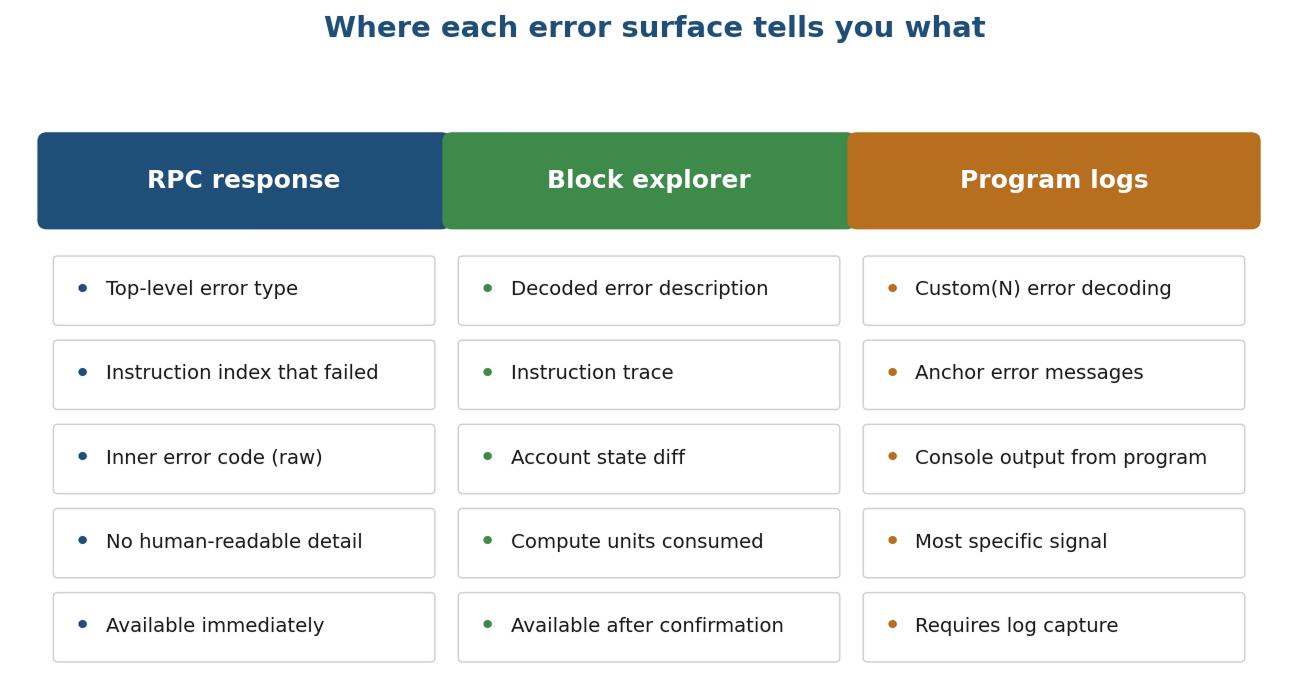
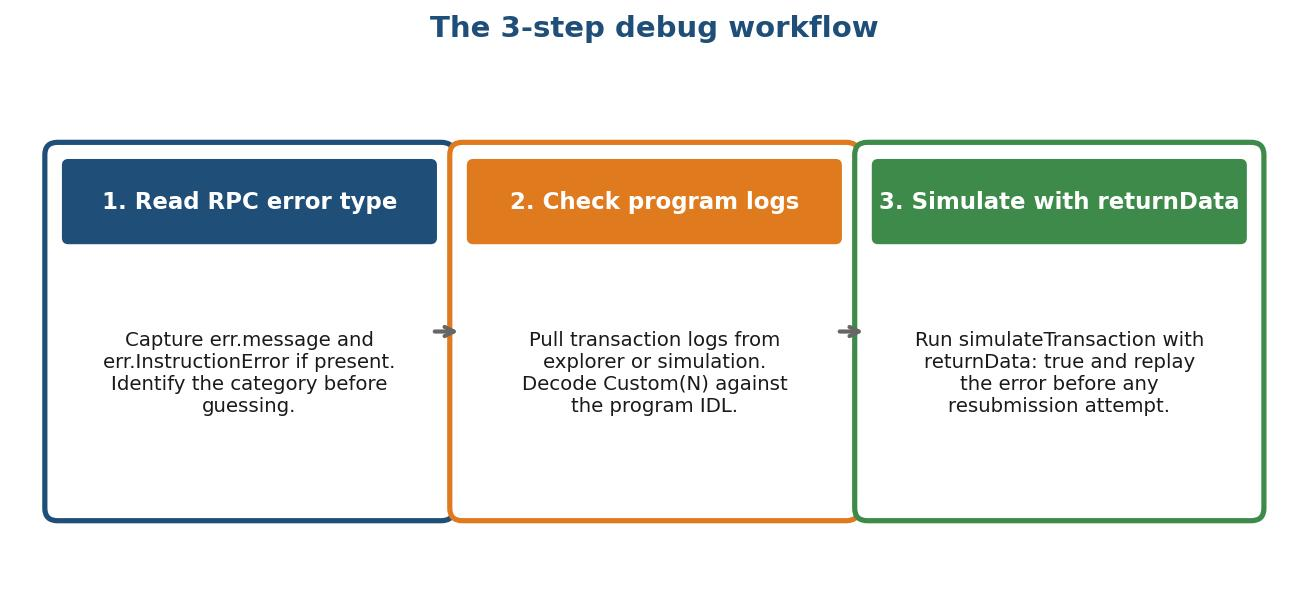
Read the RPC error type first, then check the program logs, then simulate. That sequence catches roughly 90% of Solana transaction errors in three steps without guessing or blind-retrying.
Step 1—Read the RPC response error type
Pull the error object from the RPC response and identify which category it falls into using the tables above. This step alone tells you whether you're looking at infrastructure, program logic, or RPC provider issues.
Step 2—Pull the program logs
If the error is a Custom(N), the human-readable message lives in the program logs. The logs are available from the explorer or via getTransaction with maxSupportedTransactionVersion set:
Step 3—Run simulation with returnData
Before any retry, simulate. simulateTransaction against current state reveals the exact compute units consumed, any account-state mismatches, and the program error the transaction would throw. A failed simulation costs nothing; a failed on-chain transaction still pays fees.
If simulation passes but production fails, the issue is between your build/sign step and the leader—usually RPC freshness, blockhash expiry, or submission path. Those failures are infrastructure, not code.
Simulation also exists upstream of the retry loop: RPC Fast's Aperture TxStream attaches a predicted execution result to each transaction while it is still in flight, reconstructed from deshredded data, at roughly 95% accuracy against actual execution for about +791 µs on median delivery. It is included on the Aperture plan; on the Stream plan, TxStream currently ships without simulation.
Diagnose first. Retry second.
Every Solana transaction error has a known shape, a known category, and a known fix. The trap most teams fall into is treating all errors the same—blind retry, blanket fee increase, or worse, blaming the network. Solana hasn't gone down in over 17 months. When a transaction fails, the cause is one of six specific categories, and reading the response correctly tells you which one.
Use the tables above as a reference. Run the three-step workflow before changing anything. And if the errors you're hitting concentrate in BlockhashNotFound, 429, or AccountNotFound on accounts you know exist—your RPC is the problem, not your code.
Try RPC Fast free
Start for freeFree shared Solana RPC to start. Dedicated bare-metal nodes, co-located with validators, to scale.
.jpg)


.jpg)


